Dash on e-ink.
The display page is plain HTML with no JavaScript, so almost any e-ink browser can render it. That is not the interesting question. The interesting question is whether the device will stay awake, and on most of them the answer is no.
What works
| Device | Browser | Stays awake | Verdict |
|---|---|---|---|
| Onyx Boox | Full Android browser | Yes | Best e-ink option |
| Kindle | Experimental browser | No | Glance device |
| Kobo | Beta browser | No | Glance device |
| PocketBook | Built in | No | Glance device |
| Nook GlowLight | Hidden, model-dependent | No | Try it |
| reMarkable | None | — | Not supported |
"Glance device" means tap to wake and the numbers are current within a second or two. It is genuinely useful. It is not a wall display.
The detail
Boox runs Android, so it has a real Chromium browser and real settings. It is the only e-ink family that does the always-on version properly.
Browser-capable models only. Sleeps after about ten minutes with no supported way to stop it. Full Kindle guide.
Most models hide a browser under Beta Features. It is rough, but it renders a page this simple fine.
A browser ships on most models and is easier to reach than Kindle’s.
Barnes & Noble does not advertise a browser. Several models have one reachable through a trick, and it varies by model and firmware. Worth ten minutes to find out, not worth buying a Nook for.
reMarkable ships no browser at all, and that is deliberate: it is the point of the product. There is nothing on the device that can open a URL, so Dash cannot run on a stock one. With third-party hacks it can fetch a picture, which is what the image endpoint below is for.
If you are buying one for this
Get an Onyx Boox. It is the only one here that runs a real browser on a real operating system, which means you can set the screen timeout to never and leave it. On a Boox: open the display link, set Auto-sleep and Auto-power-off to Never in Settings, keep it on a charger, and turn on full refresh if you see ghosting.
Why the display looks so plain
That is the e-ink brief, not a shortcut. Pure black on white with no greys means no ghosting between refreshes. No colour carries meaning. No web fonts, no JavaScript, no animation. It is designed for the worst screen in the list and simply looks crisp on better ones.
If your device cannot run a browser
Some devices can fetch an image but cannot render a page: a jailbroken Kindle running onlinescreensaver, a Kobo with its screensaver folder swapped, a DIY frame, a reMarkable with third-party hacks. Dash draws the display server-side for them.
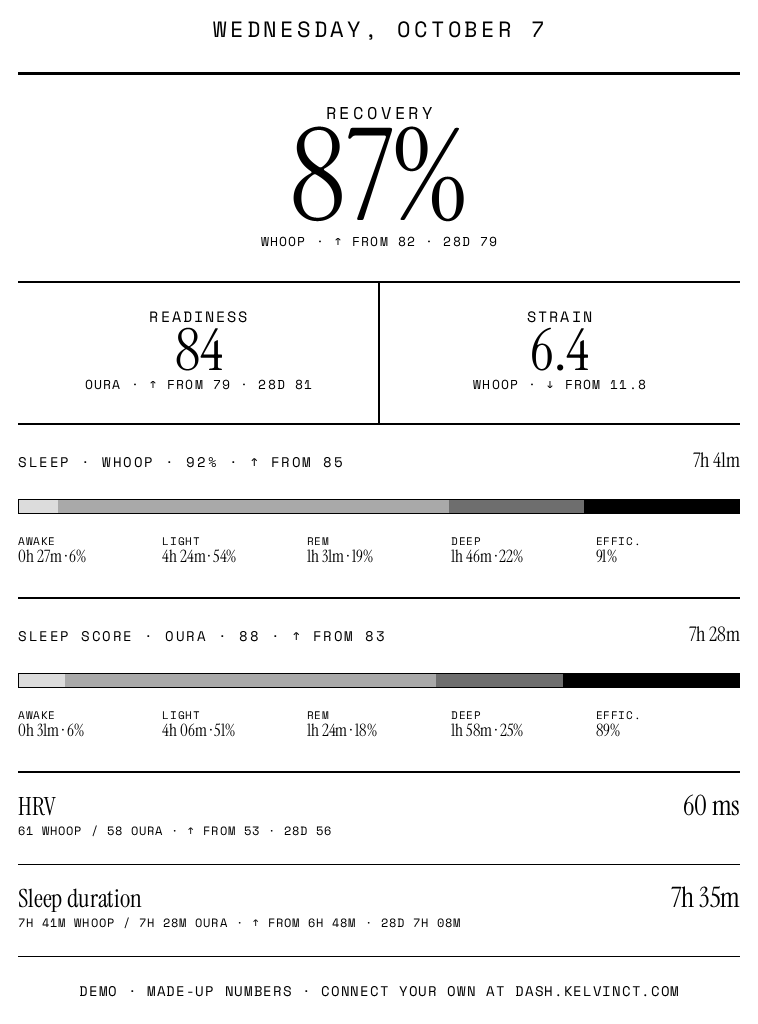
Every display link has an image twin. Add .png to the end of it:
https://dash.kelvinct.com/d/your-token.png
Same numbers, same layout, rendered as a greyscale PNG instead of a page. Point the device's screensaver script at that URL on whatever timer it already uses. Four settings, all optional:
| Setting | Does what | Default |
|---|---|---|
?w= | Image width in pixels, 400 to 1600 | 758 |
?h= | Image height in pixels, 400 to 1600 | 1024 |
?rotate= | Turn the picture 90, 180 or 270 degrees for a frame mounted sideways | 0 |
?invert=1 | White on black, for panels that prefer it | off |
A Paperwhite is 758x1024, which is why that is the default. Type sizes step down as the picture gets smaller, and if the numbers still do not fit, the footer goes first and the lowest-ranked rows after it. Nothing ever runs off the edge, because a screensaver cannot scroll.
The image sends an ETag and honours If-None-Match, so a
device polling on a timer gets an empty 304 back when nothing has changed. Worth wiring
up if the device is on battery.
Other screens
Everything else Dash is set up for: a spare monitor, an iPad, an old iPhone.